About 6 Differences
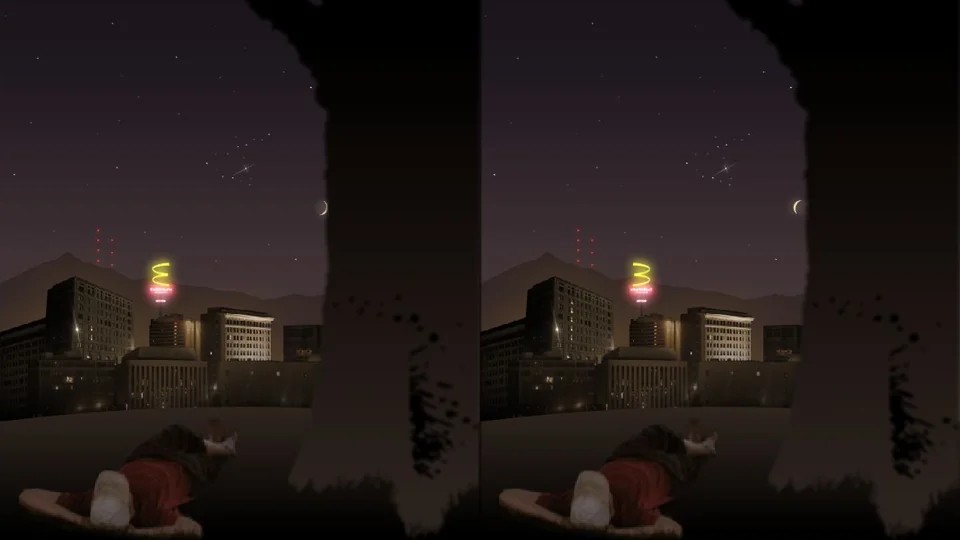
6 Differences is a spot-the-difference game with a strange, quiet streak. The opening scene puts a cat on a rooftop above a city at night. Buildings glow in the distance. Stars move. Two pictures sit next to each other, and six details refuse to agree.
The pictures aren't still, which is part of the fun. A moving light can draw your eye away from the thing you need. Look past that distraction and compare the same patch of each picture. A correct click changes the odd detail to match its neighbour; you don't have to remember which differences you've already found.
There's a choice of music at the start, so you can play with the soundtrack or leave it quiet. This is the original Flash game running through Ruffle. It needs no Flash browser plugin.
How to play 6 Differences
Find all six differences in each pair of scenes to move on.
- Choose a music option on the title screen.
- Compare the left picture with the right. Start with one object or a small area.
- Click a detail that differs. Watch it change to match the other picture.
- Keep looking through the scene until you've found all six.
- If you're stuck, press H. The title screen allows one hint per level. Save it for the difference you really can't see.
Controls
| Input | Action |
|---|---|
| Mouse | Move the pointer over the pictures. |
| Left click | Select a difference or a title-screen option. |
| H | Use the level hint. Click inside the player first so it receives the key. |
Click or tap inside the game before using the keyboard. The fullscreen button below the player gives you more room; the restart button reloads the game.
Tips for a better round
- Work across the picture in strips. Jumping from corner to corner makes it easy to check the same object three times.
- Compare colours as well as shapes. A detail can be in the right place and still be wrong.
- Let an animation repeat before calling it a difference. Movement by itself isn't proof.
Questions about 6 Differences
Do I have to click both pictures?
No. One correct click is enough to fix a difference. You can see the two details match afterwards.
Can I turn the music off?
Choose No thanks on the opening screen to play without the soundtrack.
Does it work best with a mouse?
A desktop or laptop gives you room to compare the scenes and use H for a hint. Touch-only controls haven't been verified for this restored version.
Game credit: 6 Differences / Crazy Monkey Games