About Arix Tetris Game
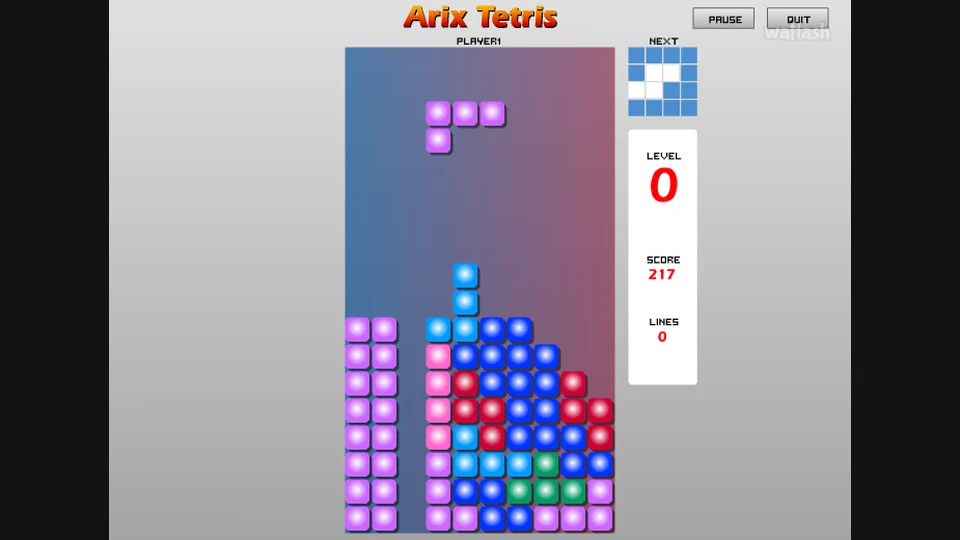
Arix Tetris gives its falling blocks a soft, rounded look, but an untidy stack is still an untidy stack. Fit pieces across the width of the well to complete rows. Spaces sealed underneath a badly placed piece are the problem to avoid: the next shapes have to build on whatever surface you leave behind.
François Auger’s title screen offers one-player and two-player modes. The Keys page puts both sets of controls side by side. Player one uses the arrow-key side of the keyboard, while player two uses A, D, W, S and Q. P pauses the game and X quits. Check the layout before a shared-keyboard round so both players know which buttons are theirs.
The solo screen shows the next piece beside the well, together with level, score and lines. That preview is worth a glance before placing the current shape. A flat-looking landing is not always helpful if it leaves nowhere sensible for the piece already on its way. Try to build a surface with a few workable choices instead of waiting for one perfect shape to rescue a very tall pile.
How to Play Arix Tetris Game
Fit falling pieces into complete horizontal rows and keep the stack from reaching the top of the well.
- Choose one player for a solo game or two players for a shared-keyboard match. Read Keys before starting.
- Move the falling piece left or right and rotate it to fit the space you are trying to fill.
- Use the next-piece preview when deciding where to leave room. Avoid covering an empty gap beneath the stack.
- Complete full rows to clear space. Keep working across the well as new pieces arrive.
- Press P if you need a pause. Use X when you want to quit the current game.
Controls
| Input | Action |
|---|---|
| Player 1: Left / Right / Up | Move left, move right and rotate. |
| Player 1: Down / Delete | Drop the piece / move it down a step, as documented in the reference controls. |
| Player 2: A / D / W | Move left, move right and rotate. |
| Player 2: S / Q | Drop the piece / move it down a step. |
| P / X | Pause / quit. |
Tips for a better round
- Look at Next before creating a narrow opening. The upcoming piece may need a different landing space.
- Keep some of the well low. A single very tall column leaves little time to move and rotate the next shape.
Questions About Arix Tetris Game
Can two people use one keyboard?
Yes. The original menu has a two-player choice and the Keys page provides a separate layout for each player.
Where is the next shape shown?
The solo game places a Next preview beside the main well, above the level, score and lines displays.