About Tanks of Freedom
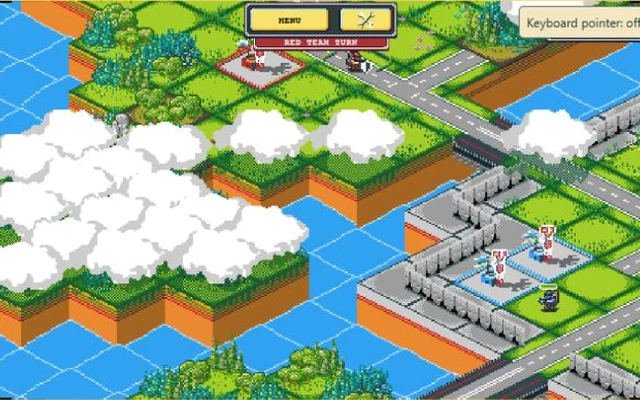
A bridge can matter as much as a tank in Tanks of Freedom. The map is split into tiles, and getting an army across the right patch of ground is part of the fight. You choose what to move, what to attack and when to hand the turn to the other side. There is time to think between actions; a fast click does not make a bad position safer.
The game uses compact isometric pixel art to show two armies contesting a map. Its campaign gives a solo player computer-controlled opposition, while local hotseat offers a battle on the same device. Buildings give you reasons to move beyond the nearest enemy. Claiming useful territory and bringing fresh units into the fight can be more important than spending every turn shooting at the first target in reach. This browser version keeps the local game; it does not provide an online matchmaking service.
How to play Tanks of Freedom
Follow the selected scenario's objective and defeat the opposing army. Keep useful units alive, claim the buildings that support your advance and make each turn improve your position.
- Start the game and choose a campaign mission or a local match. Read the scenario briefing before moving: the layout and objective should guide the opening turn.
- Select one of your units. Use the available movement and attack choices to advance across the tiles, keeping an eye on which units have actions left.
- Capture useful buildings and use the recruitment options at an appropriate owned building when available. Spend on something that can actually help on the terrain ahead.
- Check the position before ending the turn. An isolated unit may be easy to surround, and a narrow crossing can leave the rest of the army waiting. Let the opponent act, then reconsider the map rather than repeating the last move.
Controls
| Input | Action |
|---|---|
| Mouse click / touch selection | Select menu items, units, buildings and available map actions. |
| Unit and building action controls | Choose movement, attacks, capture and recruitment where the selected object allows them. |
| End-turn control | Finish your actions and pass play to the other side. |
| Menu button | Open the game menu during a battle. |
| Fullscreen button below the PlayFG player | Give the map and its small pixel-art interface more space. |
Click or tap inside the game before using the keyboard. The fullscreen button below the player gives you more room; the restart button reloads the game.
Tips for a better round
- Check the crossing before sending a unit through it. A unit at the front can block friends behind it as well as threaten an enemy.
- Use the information shown for the selected unit. An army with several units still has limits on what each one can do in a turn.
- Take a moment before pressing end turn. A useful move left unmade can cost more than a weak attack.
- Try the campaign before setting up a hotseat battle. It is an easier place to become familiar with the interface and the different actions.
Questions about Tanks of Freedom
Is this a real-time strategy game?
No. The armies take turns. You can consider the available actions before committing a move or ending your turn.
Can two people play?
The local hotseat mode is for two players sharing a device. This build does not offer online matchmaking.
Why can't a selected unit take the action I want?
Actions depend on the unit, its remaining allowance and the selected tile or target. Read its available choices instead of assuming every unit can move, attack or capture in the same way.
Game credit: P1X / w84death; music and sound by QmYaan / Grand Beats (CC BY-SA 4.0)