About OrbitSwarm
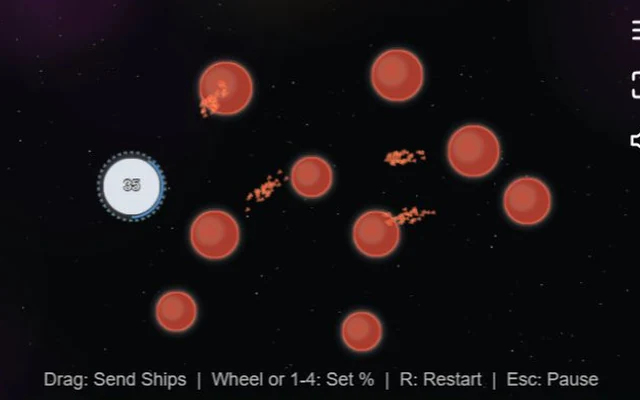
The number on a planet is a small army waiting for a destination. In OrbitSwarm, you drag from one of your blue worlds to another planet to send ships across the map. Red belongs to the computer, while neutral worlds can give either side room to expand. Ships take time to arrive, and a fleet that is still travelling cannot defend the planet it left.
The decision is how much to send. A big attack may take a valuable target, but stripping a home planet can invite trouble behind it. The enemy keeps moving while you make up your mind. EASY gives you more breathing room; MEDIUM and HARD put more pressure on the same basic rules. This is a solo match against the computer, not an online lobby.
How to play OrbitSwarm
Keep at least one blue planet and eliminate the red opponent by taking its last world. Neutral planets offer useful territory, but you do not need to own every grey world to end the match.
- Choose a difficulty at the title screen. Find your blue starting planet, the red opponent and any nearby neutral targets before sending the first fleet.
- Press on a blue planet and drag towards the planet you want to reinforce or attack. Release over the target to launch the selected share of its ships.
- Choose a smaller or larger share with the number keys, or adjust it with the mouse wheel while dragging. You can send help to a blue planet as well as attack an enemy or neutral one.
- Watch both ends of the trip. Take a weak target when the opportunity is there, but leave enough behind to survive the enemy's next move. After a loss, return to the menu or restart for another attempt.
Controls
| Input | Action |
|---|---|
| Left mouse button: drag and release | Drag from an owned blue planet to a target to send a fleet. |
| 1 / 2 / 3 / 4 | Select 10%, 25%, 50% or 100% of the available ships. |
| Mouse wheel while dragging | Adjust the proportion being sent without leaving the drag. |
| R | Restart the match. |
| Escape or Menu button | Pause or return to the menu. The result screen also accepts Space or Escape. |
Click or tap inside the game before using the keyboard. The fullscreen button below the player gives you more room; the restart button reloads the game.
Tips for a better round
- Start with a reachable neutral world rather than sending everything across the entire map. Shorter trips make it easier to react to a change.
- Check what you are leaving behind. Sending 100% can look decisive until an enemy fleet turns towards the empty planet.
- Reinforce a threatened blue planet from a safer one. Every drag does not have to be an attack.
- Remember that this runs in real time. A target's garrison may change while your ships are on the way.
Questions about OrbitSwarm
Can I play against another person?
This version provides a computer opponent. It does not offer an online room or a shared-keyboard two-player mode.
Why did my fleet fail to capture a planet?
The arriving ships must overcome its defence. The target may have gained ships or received reinforcements during the journey.
Do I have to capture all the neutral planets?
No. The match ends when either the player or the computer has no planets left. Neutral worlds can help your position without being a separate completion requirement.
Game credit: Frank Force / LittleJS Arcade