About Space Pirates
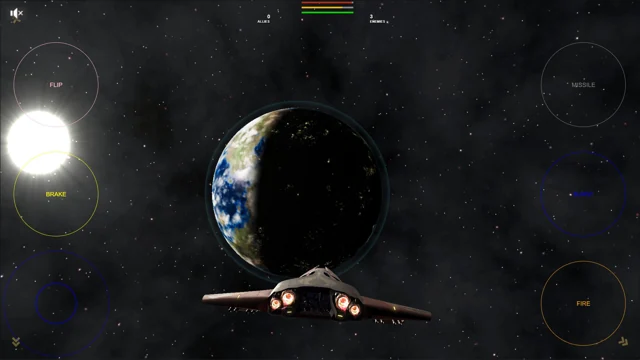
Space Pirates puts your ship against a much larger view: a planet fills the distance, rocks drift through the flight path and enemy craft keep moving while you try to line up a shot. The view follows behind your fighter, leaving the battle and the obstacles ahead of you.
Choose Play and a mission from the title screen. Solo, Squad and Battle appear in the mission selection, giving you different arrangements of ships to fight with or against. This is a compact space-combat game from the Babylon.js team. There is no trading route or character-building campaign to work through before you can fly.
How to play Space Pirates
Follow the selected mission's objectives, take down hostile ships and keep your own fighter alive. Steering away from trouble matters as much as holding the trigger.
- Choose Play, then read the mission selection before launching. Start with Solo to get a feel for the ship.
- Steer until an enemy is ahead of you, then fire the cannons. Keep adjusting your aim as the target crosses the screen.
- Use a short afterburner burst to change your position, or brake when you are overshooting the fight.
- Watch the flight path as well as the target. A rock does not move out of the way just because you are chasing someone.
Controls
| Input | Action |
|---|---|
| Mouse | Steer on the desktop control layout. |
| Left mouse; right mouse | Fire cannons; launch a missile. |
| W; S | Use afterburners; brake. |
| Q | Reverse course. |
| On-screen flight controls | On the touch layout, use the left stick to steer and the labelled Fire, Missile, Burst, Brake and Flip buttons. |
Click or tap inside the game before using the keyboard. The fullscreen button below the player gives you more room; the restart button reloads the game.
Tips for a better round
- Make a little room before accelerating. Boosting while pointed at an asteroid leaves very little time to correct the mistake.
- Break off a poor approach and turn back for another pass. Trying to drag the sights onto a ship that has already passed can cost more than starting a new approach.
Questions about Space Pirates
Why do I see a stick and buttons instead of mouse steering?
The game selects an on-screen control layout on touch-capable browsers. Use that stick and its labelled buttons when they are visible.
Do I need to download a separate launcher?
No. This version loads its game files in the browser. The first load includes 3D models, textures and sound, so give it time to finish before choosing a mission.