About Q1K3
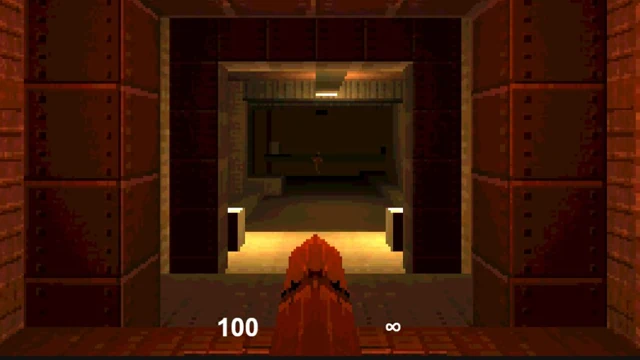
A dark corridor, a shotgun and no helpful arrow pointing the way: that is the opening of Q1K3. Walk a little further and the quiet does not last. Enemies can follow when they spot you, and a doorway that looked safe on the way in may become the only space left to retreat through. Keep track of where you came from. There is room to move, but walking backwards into an unfamiliar corner is still a bad bet.
Q1K3 has two levels and three weapons. Its chunky shapes and rusty walls belong to the early 3D shooter tradition, with lighting and sound doing much of the work. The shotgun has unlimited ammunition; the other weapons need pickups. Keys open up your route through the map, so a locked door usually means there is still somewhere worth searching. PlayFG adds a small crosshair in the centre of the view to make lining up shots easier.
How to play Q1K3
Work through both levels, fight the monsters in your path and find the way forward. Search the rooms for keys, health and ammunition instead of treating every corridor as a sprint to the exit.
- Press Play now, then click the mouse-capture button inside the player. Once the level starts, use the crosshair to aim down the corridor.
- Move with WASD or the arrow keys. Left click fires, while Space or right click jumps. Leave yourself somewhere to step back when an enemy approaches.
- Collect weapons and supplies as you explore. Use Q, E or the mouse wheel to switch weapons, and return to locked doors after finding a key.
Controls
| Input | Action |
|---|---|
| Movement | WASD or the arrow keys. |
| Aim and fire | Move the captured mouse to look around. Left click shoots towards the centre crosshair. |
| Jump | Space or right mouse button. |
| Change weapon | Q, E or the mouse wheel. |
| Mouse settings | The slider below the game adjusts mouse speed. Invert reverses vertical looking. Esc releases the mouse. |
Click or tap inside the game before using the keyboard. The fullscreen button below the player gives you more room; the restart button reloads the game.
Tips for a better round
- Use the shotgun when you want to conserve the ammunition for your other weapons. Unlimited shots do not make you safe while reloading between them.
- Check a room before moving on. A missed key can leave you retracing the same corridors later.
- Give yourself space around a corner. Seeing an enemy early is useful only if you still have room to dodge it.
Questions about Q1K3
How long is the game?
There are two levels. How quickly you finish depends on the fights and how much time you spend exploring.
Does the shotgun run out of ammunition?
The shotgun has unlimited ammunition. Pickups matter for the other weapons.
Why is there a crosshair on PlayFG?
It is a small addition to this version, placed over the centre of the game view. It stays centred when the player changes size.
Is there a download or account to set up?
No installer or account is needed. The browser loads the game files when you start playing; a keyboard and mouse are recommended.