About Complements
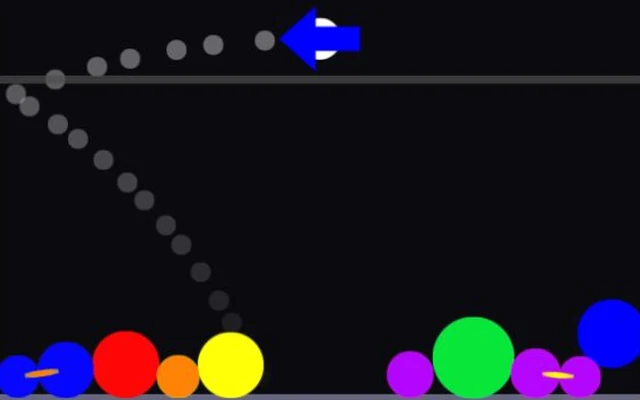
A red shot aimed at a red ball won't do the job here. Complements asks you to remember four pairs: red with green, orange with blue, yellow with purple, and black with white. The pile at the bottom behaves like a pile of loose objects. Balls roll into gaps, knock neighbours aside and sometimes leave the colour you need buried under something else.
You fire downwards from a launcher above that pile. Hold the shot and its size changes; release and you have to live with the angle you chose. There is a descending line to worry about as well. On EASY there are only 20 starting pieces, which sounds comfortable until the last few are tucked away in corners. The 40, 60 and 80-piece boards are there when you want more of a scramble.
How to play Complements
Clear the starting pieces before the falling danger line reaches them. A nearly empty board still counts as unfinished, so keep an eye on the awkward little pieces left behind.
- Choose PLAY, then EASY for a first try. Look at the current shot and the colours on the surface of the pile before firing.
- Move the pointer to aim. Hold the left mouse button while watching the shot grow and shrink, then let go to launch it. A brief hold and a long hold can produce quite different collisions.
- Work on exposed opposite colours first. If the shot is transparent, it is a Clear gem: contact with another piece gives it a colour.
- Watch where the pile settles between shots. Use a shake when it is available if an important piece is trapped. After the result, BACK takes you to the title screen for another board.
Controls
| Input | Action |
|---|---|
| Mouse movement | Aim the launcher when MOUSE AIM is enabled in OPTIONS. |
| Left mouse button: hold, then release | Adjust the current gem and fire it when you release. |
| Space or up arrow: hold, then release | Keyboard alternative for charging and firing. |
| Left / right arrows | Turn the launcher when MOUSE AIM is switched off. |
| Right mouse button or down arrow | Shake the pile when enough shake energy is available. |
| Menu button | Pause the game and reach its restart and options controls. |
Click or tap inside the game before using the keyboard. The fullscreen button below the player gives you more room; the restart button reloads the game.
Tips for a better round
- Try the small shot before committing to a large one. More mass can shift the pile, but it won't make the wrong colour useful.
- Look at the sides as well as the middle. A piece exposed by the previous collision can be easier to reach than the target you originally wanted.
- Don't save every shake for the final second. If the pile is hiding the colour you need and there is enough energy, rearranging it now may buy time.
Questions about Complements
Why did two gems of the same colour fail to clear?
The game uses complementary pairs: red/green, orange/blue, yellow/purple and black/white. Aim for the opposite colour.
What does the transparent gem do?
A Clear gem adopts a colour from a piece it touches. Read the resulting pile before choosing your next shot.
Why did the round end with pieces still near the bottom?
The danger line keeps descending. You need to finish the board before it reaches the remaining pieces, rather than just keep the pile low.
Game credit: Frank Force / LittleJS Arcade