About Astroblast
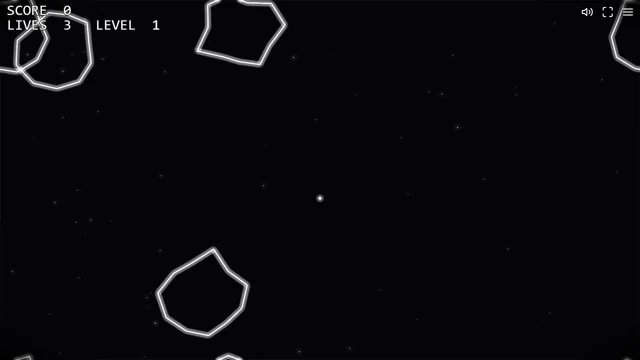
A little triangular ship, white outlines and far too many rocks: Astroblast gets to the point quickly. Your ship turns in place, thrust pushes it forward and the drift continues when you let go. The first surprise is usually that turning the nose does not immediately change where you are going.
Shooting a large asteroid breaks it into smaller targets. That clears one danger and creates a few more, so a screen that looked manageable can become busy very quickly. Saucers join the trouble as you play. The score, lives and level stay at the top of the screen; keep a glance spare for the space around your ship.
How to play Astroblast
Clear the asteroid waves, score points and survive with the lives you have left. Once a wave is cleared, another gives you more to deal with.
- Choose Play, then click inside the flight area so the game receives your keyboard input.
- Turn with Left and Right or A and D. Use Up or W for a short burst of thrust and watch how the ship keeps drifting.
- Press Space to shoot at the rocks. Follow the smaller pieces after a large one breaks apart.
- Use hyperspace when you need to leave a crowded spot. After losing your lives, start another run from the menu.
Controls
| Input | Action |
|---|---|
| Left / Right or A / D | Rotate the ship. |
| Up / W | Thrust forward. |
| Space / Z | Shoot. |
| Shift / X | Use hyperspace when available. |
| Escape / Menu | Pause and open the menu. |
| Touch gamepad | Use the on-screen stick and buttons when the touch layout is available. |
Click or tap inside the game before using the keyboard. The fullscreen button below the player gives you more room; the restart button reloads the game.
Tips for a better round
- Leave gaps between bursts of thrust. Constant acceleration makes it harder to judge the next collision.
- Do not chase one small rock through a crowded area. Turn toward clearer space and let another target come into range.
Questions about Astroblast
Why am I still moving after releasing W?
The ship has momentum. Rotate and apply thrust in another direction to change its course; releasing the key is not a brake.
What happens at the screen edge?
Objects wrap around the play area. Watch the opposite edge too, because leaving one side does not remove an asteroid from the game.