About LittleJS Mini Golf
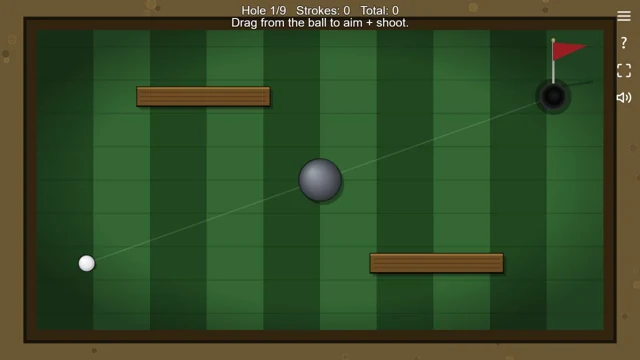
Hole one puts the ball near the bottom-left corner and the cup towards the top right. In between are a round grey bumper and two wooden barriers. You can try going straight at the flag, but the obstacles give that plan a fairly obvious problem. Look for the gap first, then decide how much of the trip to attempt with one shot.
All nine greens are visible on the selection screen. Pick one with the mouse, or use the number keys to jump to a hole. Once you're playing, each release of the ball adds a stroke. There's no prize for hitting it as hard as you can: an overshoot simply leaves you with another shot to make. Let it stop before aiming again, especially when it finishes close to a wall.
How to play LittleJS Mini Golf
Put the ball in the cup using as few strokes as possible. Play through the nine holes for a total score, or practise a particular layout.
- Choose a hole from the preview grid. Find the ball, the flag and any obstacle across the direct route.
- Drag from the ball to aim and choose the strength of the shot. Release to hit it, then wait for the ball to settle.
- Take the next stroke from its new position. Use the menu to return to the course previews if you want another hole.
Controls
| Input | Action |
|---|---|
| Aim and hit | Click or touch the ball, drag, then release to shoot. |
| Choose a hole | Select its preview. The number keys 1 to 9 also select holes. |
| Menu and help | The menu icon returns to the hole grid; the question mark opens help. |
Click or tap inside the game before using the keyboard. The fullscreen button below the player gives you more room; the restart button reloads the game.
Tips for a better round
- Start with a modest shot when you don't yet know how far the ball will roll.
- Look for a clear route around a bumper instead of aiming straight through it.
- Practise one awkward hole a few times before trying to improve the total for the whole course.
Questions about LittleJS Mini Golf
How many holes are there?
There are nine layouts, each visible on the course selection screen.
Can I pick a hole directly?
Yes. Click its preview or use a number key from 1 to 9.
Does the game use a keyboard to aim?
The shot uses a mouse or touch drag. The keyboard shortcuts are for choosing holes.